
3D Mapping for All using Artificial Intelligence
But is it really for all?

In the last few years, Esri, perhaps the largest GIS company in the world, began releasing some pretrained “deep learning” packages for classifying data from satellite and aerial imagery and LiDAR point clouds. Deep learning is a subset of machine learning, which is a subset of AI. I should note here that I am no expert in AI—I work primarily on the geospatial infrastructure and data management side of things, and while I do have a passion for and undergraduate education in geospatial analysis, I finished up my coursework in 2018, well before OpenAI’s ChatGPT burst onto the scene at the end of 2022 like the Kool-Aid man and changed everything.
In the mid-2000s I recall that AI tools for machine learning and deep learning were something used by really smart academic types and very specialized companies. People like Dr. Greg Asner at Stanford University were exploring machine learning to get better results out of massive datasets:
Meanwhile, remote sensing companies like LandIQ were classifying and analyzing imagery to do things like find all the Almond trees in the state of California or taking that data as well as other classified land use data and providing it to agencies such as the California Department of Water Resources for further analysis. In both cases, we’re talking about well-funded, deliberate, and time-intensive efforts, often with data that simply wasn’t available to the public without significant cost.
But if you listen to the news and some of these companies and interests getting into AI, you’ll hear all about how access is being democratized and how anybody can in fact “get into the business” of AI.
Like most people, I remember how exciting the release of ChatGPT was. My mind raced as I tried to think of potential use cases in my field. And of course, I simply played around with it. I asked it to write a song about hot wheels:
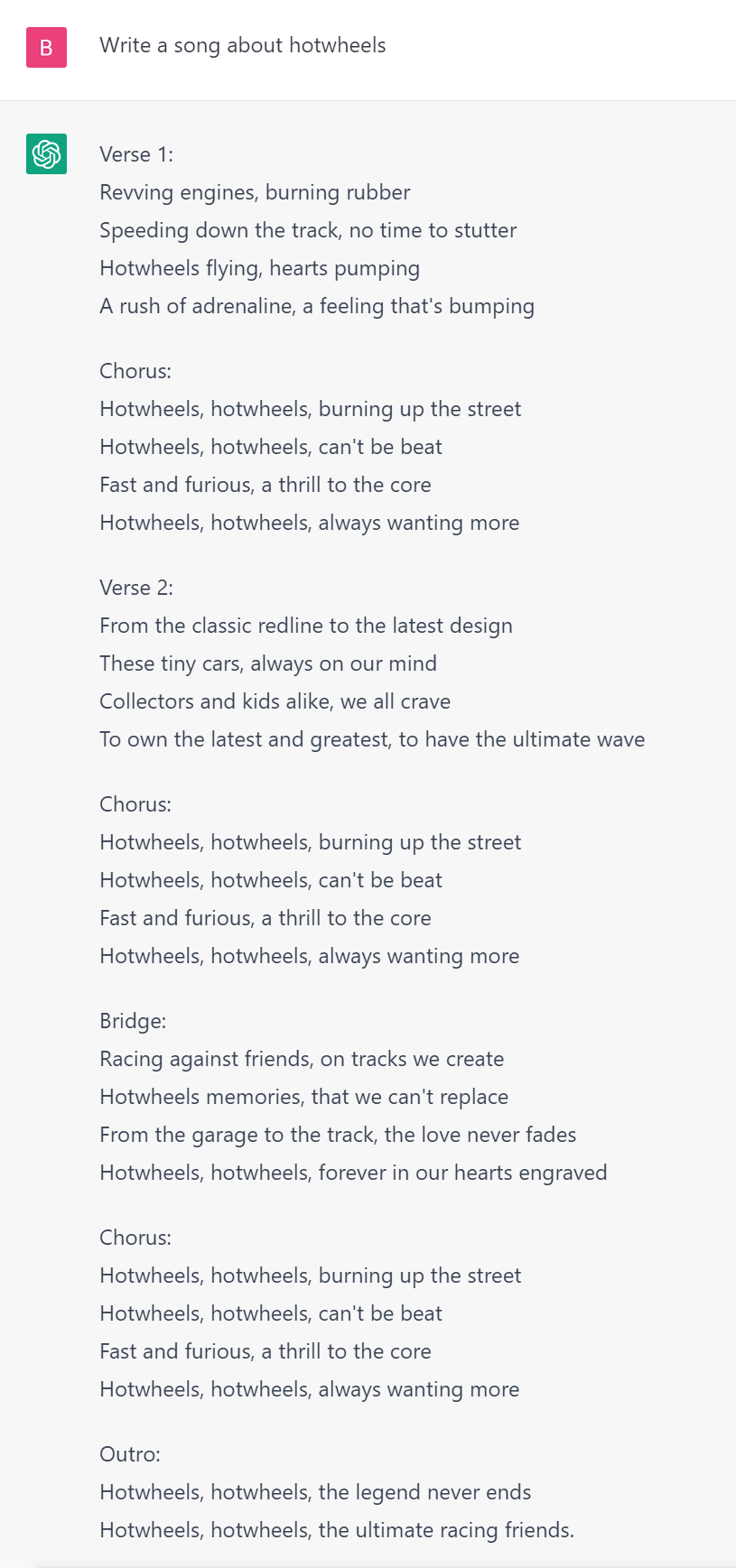
While that is fun, the more I thought about it and explored it as a potential solution for work processes I was involved in, the more I began to think it wasn’t so useful after all. Ask it to write some python or SQL code, and you might receive unusual or not useful returns. I started reading articles talking about AI hallucinations of large-language models (LLMs) like ChatGPT and the need to write good prompts for good results and the cottage industry that has sprung up around how to do that. So, I put AI down, stopped thinking about it, and went about my normal work. Then I attended the 2024 Esri User Conference in San Diego.
Geospatial AI and Deep Learning
At the Esri UC, I attended a session called GeoAI in ArcGIS led by Jay Theodore, Esri’s CTO for ArcGIS Enterprise and AI technologies. He said something really interesting about AI:
It’s not something that just got started at Esri yesterday, it’s been around for a long time. In fact we started with AI in 2008 with machine learning, and you might think, oh really? So I thought you know just for all of us, let’s get on the same page in terms of some definitions. It’s obvious that AI is trying emulate human understanding, human reasoning, and also some aspects of human decision-making. That’s what the whole area of AI is. Within that, a subset of that, a pretty significant subset and implementation of it is machine learning. Its basically going from algorithmic ways of deducing answers, which is what we’re traditionally used to, to a different mechanism where you can train, and based on that, come up with answers. And then a subset of that is deep learning. It’s an advanced form of machine learning where neural networks, which are basically how the human brain works, is emulated in these machines. And it progressively tries to decipher and find the answers you’re looking for.
He goes on to describe generative AI and LLMs, but the core message is that there are many different kinds of AI, they have different purposes, and in some cases, they’ve been used for quite a long time in the geospatial industry.
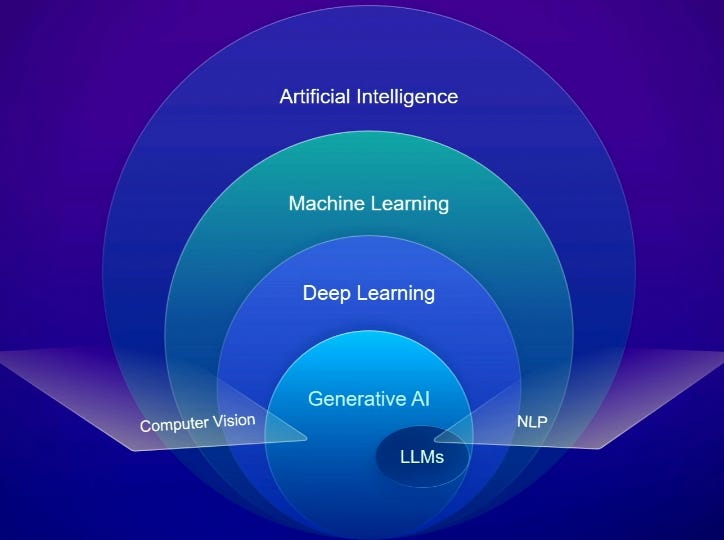
In the case of deep learning, there are use cases for image and point cloud classification. These are things that can be done outside of a deep learning perspective by simply training a model to identify patterns of points or pixels as certain objects. I’ve tried my hand at this myself in the past with limited success using some pretty high resolution drone imagery when I worked for the State Lands Commission in California. Of course, I had no idea what I was doing really; and there was no operation in place for some of the advanced training and ground-truthing that is necessary (which I will get to later on). It is probably no surprise that my initial testing did not go well.
Jay and his co-presenters also discussed pre-trained deep learning packages, which Esri claims have a much higher level of precision and accuracy than when they were initially released. But in most use-case presentations I have seen, organizations are not simply using these models right off the shelf—they are taking them and doing further fine-tuning and training. You can see this even in the packages available on Esri’s Living Atlas Website, which for example offers separate car detection packages for the United States and New Zealand, from which we can infer that the cars in each respective country are different, and the deep learning packages are trained to best-recognize the cars typically present in those countries.
Needless to say, I was very interested in putting these packages through their paces. In fact, I made a list at the time of some of the packages, and highlighted the ones I was interested in:
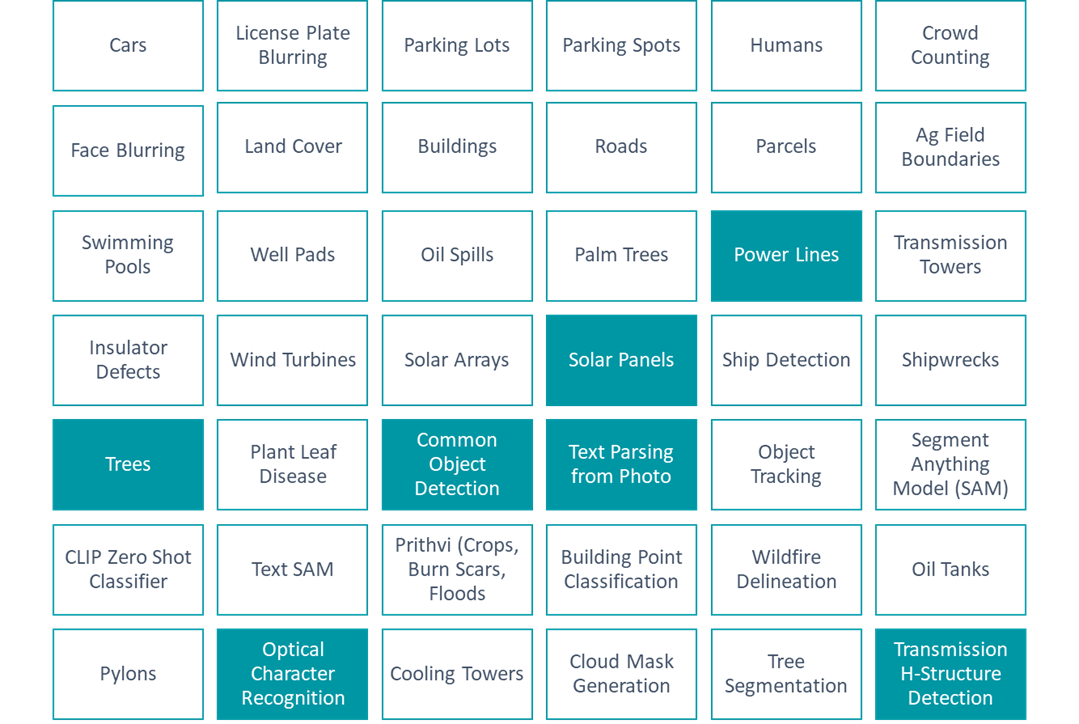
I started with power lines and trees, with visions of vegetation management solutions dancing in my head. There are many companies who offer this as a service, and it can get very expensive very quickly. There is a cost savings and liability-reduction argument to be made for this sort of work replacing the work of vegetation management crews driving lines all day to find areas where vegetation interferes with power lines, but that is a conversation for another day and another article. Here, I was simply doing a thought experiment and trying to run this tool through its paces. But I quickly ran into a problem before I could even get started: the data.
Geospatial Data Needed for Classification and Analysis
It turns out, the data requirements to run these tools and packages can be very restrictive and expensive. Setting aside the extensions you need in a software like ArcGIS Pro to run the tools - the 3D Analyst extension for point clouds and the Image Analyst extension for imagery - you can’t just use any old image of the earth’s surface to do this analysis.
Before we go any further however, perhaps it’s best we unpack a few terms we’ve been talking about throughout this article.
Classification
When you “classify” an image or a point cloud, you’re going pixel by pixel or point by point and deciding what that spot represents. For example, all the pixels of an image of someone’s backyard pool might be classified as “water” or “pool.”
LiDAR - Light Detection and Ranging
If you aren’t familiar, the USGS website has a pretty good description of LiDAR. Think of how radar or sonar is used to map something by bouncing off an object, except in this case, we’re talking about light, and we’re bouncing the light off the ground, or structures on the ground, from an aircraft. Each time the light bounces off something and returns represents one point in a “point cloud.” These points may bounce off the ground, the roof of a house, or a tree.
Deep Learning
Finally, “deep learning” is a type of AI analysis. In our classification example above, a deep learning process might have been trained on what a backyard pool looks like in an image and a point cloud. In this situation, you’re running a geoprocessing tool such as Esri’s Classify Pixels Using Deep Learning or Classify Point Cloud Using Trained Model. One of the inputs for those tools is a deep learning package. In this case, as the tool is run the package would provide the information necessary to find all those spots in the image that are backyard pools. Training these deep learning models to accurately to detect features is a time-intensive task. It involves a need for significant compute time and power, as well as ground-truthing to make sure results represent the actual truth on the ground.
In our vegetation management example where we’re trying to find the places trees overlap with power lines, I understood my options were to use high resolution imagery, or LiDAR point clouds. I chose imagery, reasoning that it was much more likely that imagery was widely available than LiDAR data.
The only problem was that the toolset indicated an imagery resolution requirement of no more than 25 cm; that is less than 1 foot. My heart sunk. The highest resolution of publicly available data that I knew of at the time was NAIP, or National Agriculture Imagery Program, which is typically at 1 meter resolution. And there was another problem—NAIP covers an area only once every few years. The free-to-the-public imagery programs with a higher update cadence that I knew of were satellite-based and had resolutions like 10 meters, or even 30 meters (such as Sentinel-2 or Landsat). This is much too coarse for the analysis I wanted to do, and in a production setting for a company or agency, running this sort of analysis every few years just won’t do. You would need high resolution imagery, and you would need it more often.
There are companies that create and sell this data. Companies that either own satellites or commission aerial photography missions. For example, the company Maxar. But the cost of these images can be tens of thousands of dollars each time you request it, depending on the area you’re requesting. Certainly not a reasonable cost for someone like me, and in the context of vegetation management, it is probably too much to ask for small utility companies to foot this bill over and over again, as would be required.
So not only was I dead in the water in terms of even finding the imagery I needed, but having the process be repeatable was also not in the cards due to the lack of the regular updates of the data. As for LiDAR data, in my experience LiDAR is even harder to come by than imagery. I barely spent anytime even looking for it.
More recently however, and as part of this Geospatial Explorer effort, I decided to look into the deep learning packages again, as well as the data available, to see if there was anything that could be done.
LiDAR Data and The Microsoft Planetary Computer
I’ve known about the Microsoft Planetary Computer for about a year now, which initially released in 2020. It has, over time, added more and more data. It is a great resource that has slowly increased in capability. In a recent review of the planetary computer, I found a national catalogue of LiDAR data housed by the US Geological Survey and easily accessible through their 3DEP LiDAR Explorer application.
Almost on a lark, I used the application to see what LiDAR data was available in the rural farming town of Hermiston, Oregon. I expected to find nothing—as I’ve said, in my experience LiDAR data isn’t easy to find. What I found was a whole lot of data covering most of the United States. This included full coverage of the city of Hermiston from data obtained in 2019. And while that is now 6 years ago, I cannot overstate how amazing it is to find data like this openly available on the internet for free.
As far as the point cloud classification toolset goes, Esri’s deep learning packages on Tree Point, Power Line, and Building classification don’t have any resolution requirements. While I am sure LiDAR point cloud processing, as with everything else, subscribes to the garbage-in-garbage-out theory, this data was acquired and processed by a company called NV5 Geospatial for the United States Geological Survey (USGS). I have no doubt it is plenty good for my purposes.
Does this solve the issue of developing a repeatable process for something like vegetation management? No, it does not. This data is from 2019, and certainly wouldn’t help a utility company find areas that need clearing in 2025. But, that is not really the goal of the Geospatial Explorer.
What I want to know is this: Can I take public data, run it through publicly available pre-trained deep learning packages, and produce something useful? In other words, has the public availability of data and tools really made geospatial AI processes available to everyone?
In my next article, I will go about answering that question by describing how I acquired, prepared, and classified the data.